How to run an LLM locally on iPhone, iPad and Mac (no Terminal needed)
· By Modelbase Team
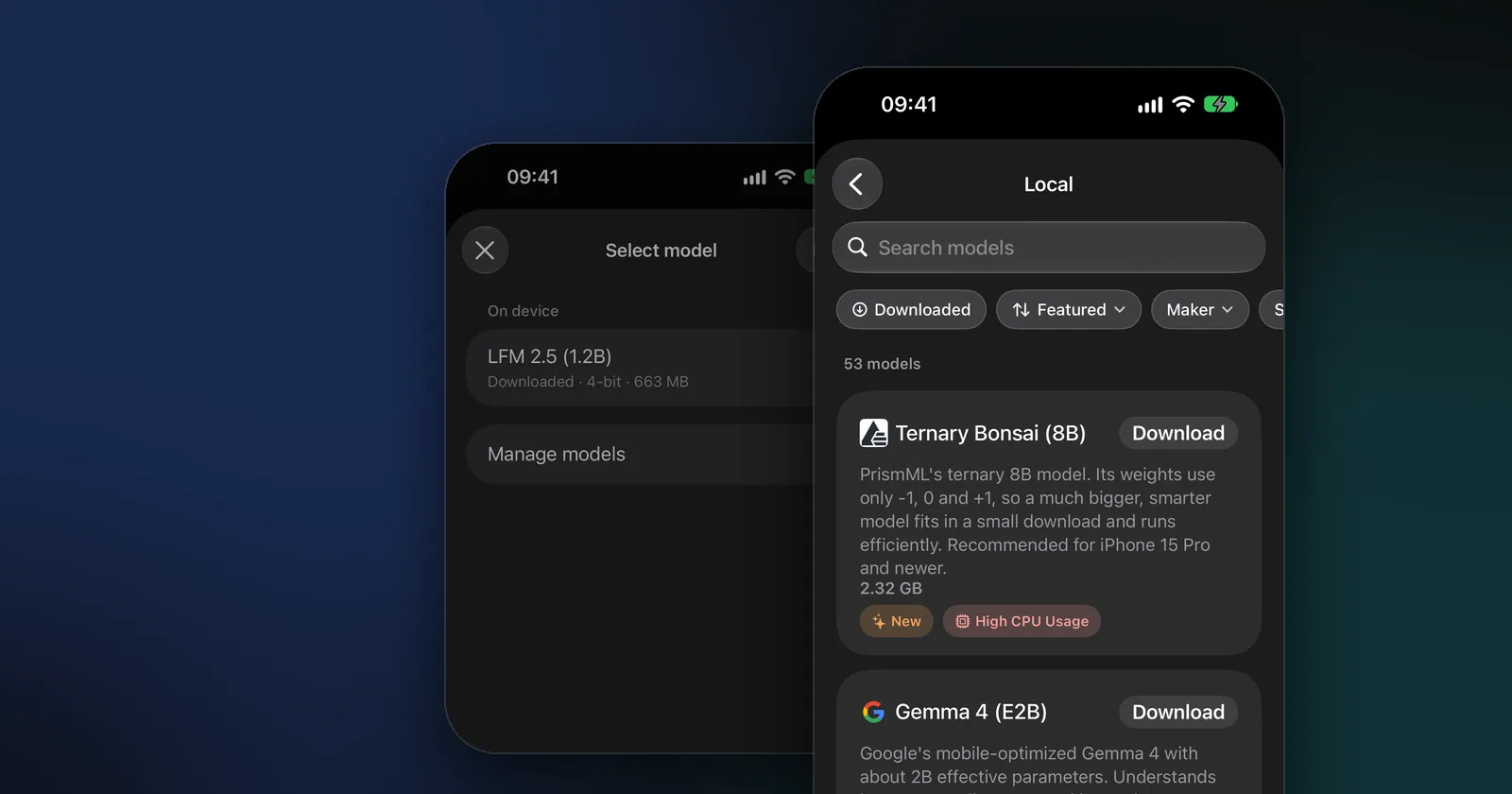
To run an LLM locally on an iPhone, iPad or Mac, you need three things: an app with a built-in model runtime, a model small enough for your device’s memory, and a few minutes. With Modelbase, a free app built on Apple’s MLX, it’s even simpler: the first model comes inside the app, so you can open it and start chatting, with no Terminal, no account and no internet connection.
This guide covers what “running locally” means, what your device needs, the steps on iPhone, iPad and Mac, and how to choose a model that fits.
What does “running an LLM locally” mean?
An LLM (large language model) is the part of an AI chat that writes the answers. Running it locally means the model’s file sits on your own device and your device’s chip does the work, instead of a company’s server.
That changes three things:
- Privacy. Your messages are processed on your device and never have to leave it.
- Offline use. Once the model is downloaded, it answers with no connection: on a flight, abroad, anywhere. (Here’s why ChatGPT can’t do that.)
- Cost. No subscription and no per-message pricing: the model is yours to use as much as you like.
The trade-off is size. A phone holds models of roughly a few hundred million to a few billion parameters, much smaller than the models behind cloud chatbots. They’re very capable at everyday tasks, but they know less and make more mistakes on hard questions. Our explainer on small language models covers what that means in practice.
What you need
| iPhone and iPad | Mac | |
|---|---|---|
| System | iOS 18 or later | macOS 15 or later |
| Chip | Any device that runs iOS 18 | Apple silicon (M1 or later) |
| Memory | More memory runs bigger models | More memory runs bigger models |
| Storage | 0.2 to 3.6 GB per model | 0.2 to 3.6 GB per model |
| Internet | Only to download extra models | Only to download extra models |
The included model, LFM 2.5 (1.2B) by Liquid AI, takes 663 MB. Every other model is a separate download that you can delete again at any time.
How to run an LLM on iPhone and iPad
- Install Modelbase from the App Store. It’s free and needs no account.
- Open it and type a question. The first model is already installed, so the chat works straight away, even in airplane mode.
- Open the model picker. Tap the model’s name at the top of the chat. The Select model sheet lists the models on your device under “On device”, with their size and quantization (for example “4-bit · 663 MB”).
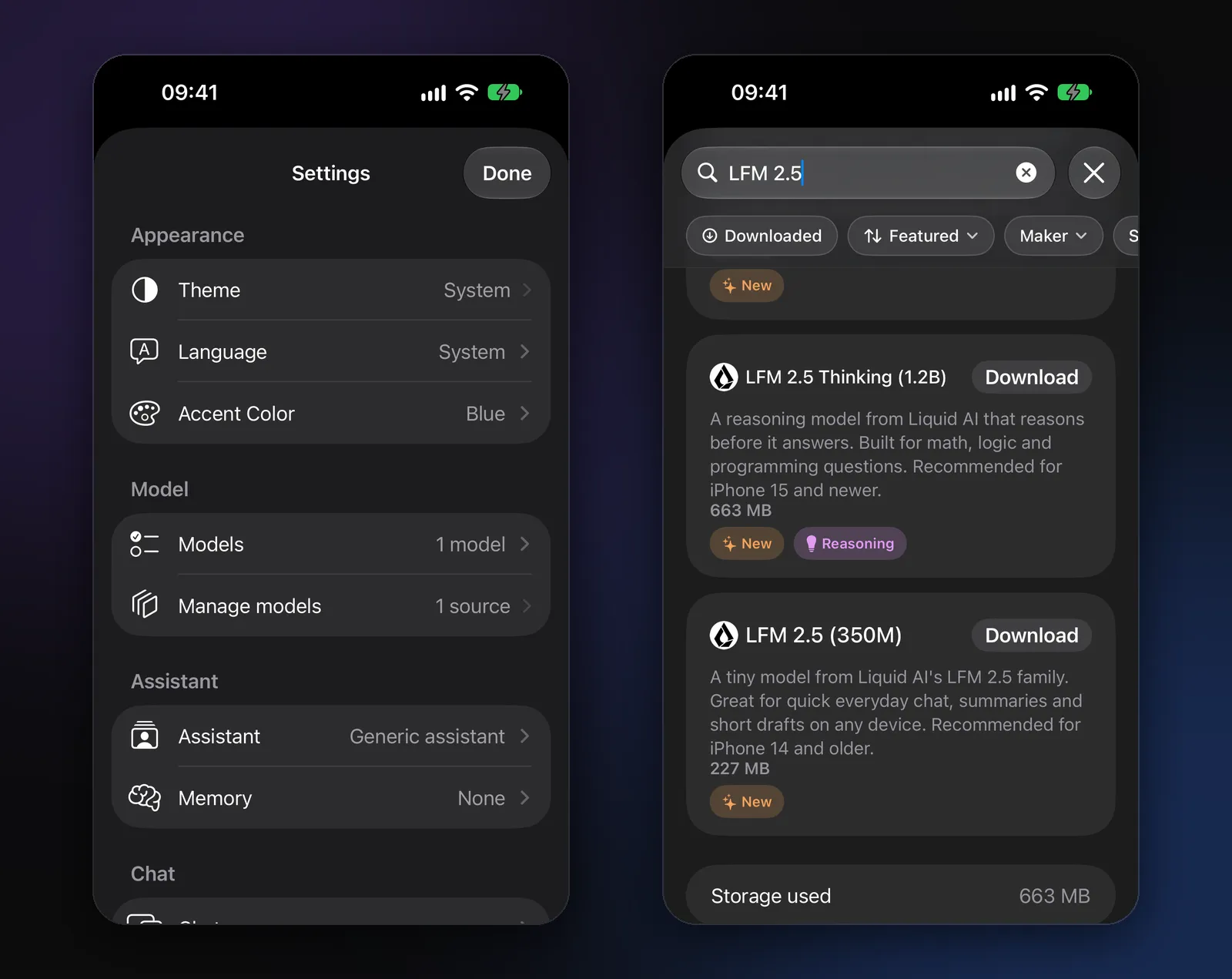
- Browse the catalog. Tap Manage models, then Local. You’ll see all 53 models with a short description, their download size and tags such as Vision (it can look at photos) or Reasoning (it thinks before it answers). Search by name, or filter by maker and size.
- Download a model. Tap Download on its card. When it’s done, the card shows a checkmark and a Delete button.
- Switch to it. Back in the chat, tap the model’s name and pick the new model. You can switch models in the middle of a chat.
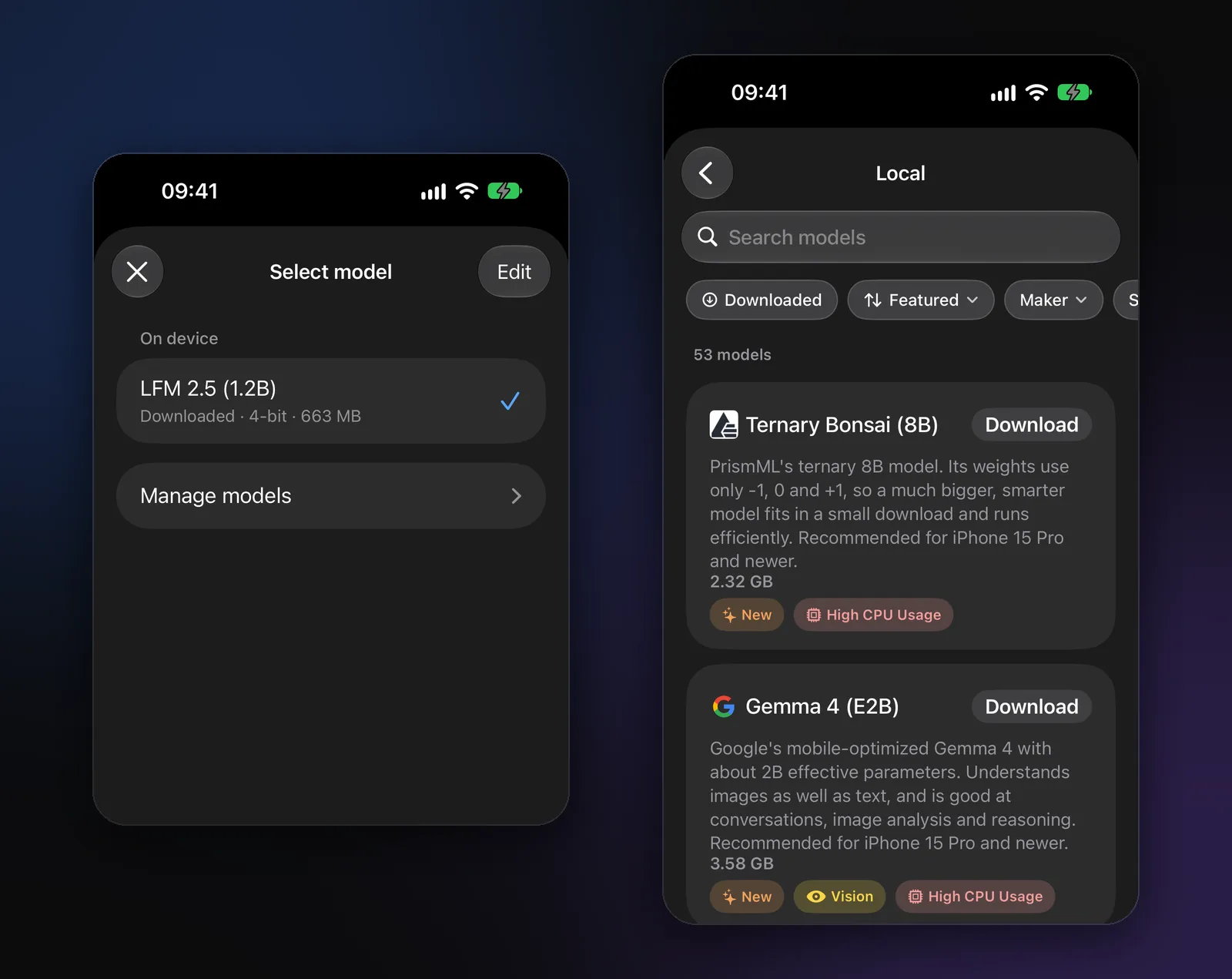
Each model card also says which iPhones the model is recommended for, such as “Recommended for iPhone 15 Pro and newer”, which is the quickest way to know whether a model will run well on yours.
How to run an LLM on a Mac
Modelbase also runs on Macs with Apple silicon and macOS 15 or later, with the same models and the same steps: open the model picker from the chat, go to Manage models, download, and switch.
Two things are different on a Mac:
- More memory. Most Macs have more memory than a phone, so the larger models in the catalog, such as Qwen 3.5 (4B), Gemma 4 (E2B) or Phi 4 Mini (3.8B), are a comfortable place to start.
- Your models are files you can see. Modelbase can show its models folder in Finder, so you always know what’s taking up space.
If you use Modelbase on several devices, your chats can sync through your own iCloud. Downloaded models don’t sync: each device downloads the models it needs, so a Mac can keep bigger ones than your phone.
How big a model can your device run?
A model needs its download size, and a bit more, in free memory while it answers, next to the system and your other apps. That’s the main limit on what you can run.
| Download size | Typical models | Where it fits |
|---|---|---|
| Under 1 GB | LFM 2.5 (1.2B), Qwen 3.5 (0.8B), Llama 3.2 (1B), Gemma 3 (1B) | Every supported device; on iPhone 14 and older, the smallest ones such as LFM 2.5 (350M) |
| 1 to 2 GB | Qwen 3.5 (2B), Llama 3.2 (3B), Granite 4.0 H Micro, DeepSeek R1 (1.5B) | Recent iPhones, iPads and every Mac |
| Over 2 GB | Qwen 3.5 (4B), Phi 4 Mini (3.8B), Gemma 3 QAT (4B), Gemma 4 (E2B) | iPhone 15 Pro and newer, iPads and Macs with more memory |
The three bands are the same as the size filter in Manage models. The numbers in a model’s name are its parameters: “1.2B” means 1.2 billion. The “4-bit” in the model picker means each parameter is stored in 4 bits, which is why a 1.2-billion-parameter model fits in 663 MB.
Which model should you start with?
| You want | Start with | Download |
|---|---|---|
| Fast everyday chat | LFM 2.5 (1.2B), included | 0.66 GB |
| A strong all-rounder | Qwen 3.5 (2B) | 1.75 GB |
| The best answers on a phone | Qwen 3.5 (4B) | 3.06 GB |
| Questions about photos | LFM 2.5 VL (1.6B) | 1.5 GB |
| Math and logic | LFM 2.5 Thinking (1.2B) | 0.66 GB |
| A DeepSeek model | DeepSeek R1 (1.5B) | 1.01 GB |
For the full comparison, see Which AI model should you run on your iPhone?, and for the big families head to head, Gemma vs Llama vs Qwen and Qwen vs DeepSeek. For DeepSeek specifically, see How to run DeepSeek R1 locally. Single-model guides cover LFM 2.5, Llama 3.2 and Phi 4 Mini, and what a reasoning model is explains the thinking levels.
What runs on the device, and what doesn’t
Everything the model does runs locally: writing, answering, summarizing, looking at a photo you attach (see how), reading a PDF (see how), and voice chat with speech recognition on the device. Some features reach out on purpose, and only when you use them:
- Web search sends the search query to DuckDuckGo and Wikipedia and answers with numbered sources.
- Weather, stocks and places ask Open-Meteo, Yahoo Finance and Apple Maps.
- Cloud models you connect yourself (OpenRouter with your own key, or a server of your own) receive the chats that use them.
Each of them is optional, and none of them sends anything to us.
Other ways to run LLMs locally on a Mac
If you’re a developer or like the command line, there are other good tools, and they can work together with Modelbase:
- Ollama and LM Studio run models on a Mac (or PC) and offer an OpenAI-compatible server (LM Studio vs Ollama).
- MLX LM is Apple’s Python package for running and fine-tuning models with MLX from the Terminal.
- llama.cpp is the engine behind many apps that use GGUF model files.
A model running in one of these on your Mac can be added to Modelbase as a server of your own (Settings > BYOK, or the + in Manage models). Its models then appear in the model picker on your iPhone next to the local ones, as long as the phone can reach the Mac. Plain http works only on your own network; outside it, the server needs https.
For a side-by-side look at the desktop apps (LM Studio, Ollama, Jan, Msty, AnythingLLM and others), see The best apps to run local LLMs on a Mac; for other iPhone apps that run models on the phone, The best offline AI apps for iPhone.
FAQ
Can an iPhone run an LLM?
Yes. Any iPhone that runs iOS 18 can run a small LLM with an app like Modelbase, which comes with LFM 2.5 (1.2B) installed. Newer iPhones with more memory run larger models, such as 4B models or Ternary Bonsai (8B), which fits 8 billion parameters into a 2.32 GB download.
Do I need the internet to run an LLM locally?
Only to download a model. Modelbase’s first model is already in the app, so you don’t even need that: it answers in airplane mode from the first launch.
Is running an LLM on my iPhone free?
With Modelbase, yes. The app is free, the models are free to download, and there’s no account or subscription.
Does it drain the battery?
Running a model is hard work for the chip, so long answers use battery faster than most apps and can make the phone warm. Short chats are fine; for long sessions, a smaller model is easier on the battery. Model cards mark the heavier models with High CPU Usage.
Can I run bigger models than my phone holds?
Not on the phone itself, but you can use them from it: connect OpenRouter with your own key, or a server on your own computer, and those models appear in the same picker. They run elsewhere, so they need a connection. Some are free within limits; see free LLM APIs.
Is a local LLM private?
Yes. A model on your device processes your messages on your device. Modelbase has no account and no analytics, and your chats are never sent to us. See our privacy policy for the details.
Try it on your iPhone, iPad or Mac
Modelbase is free on the App Store.