
How to ask AI about a photo on your iPhone, without uploading it
· By Modelbase Team
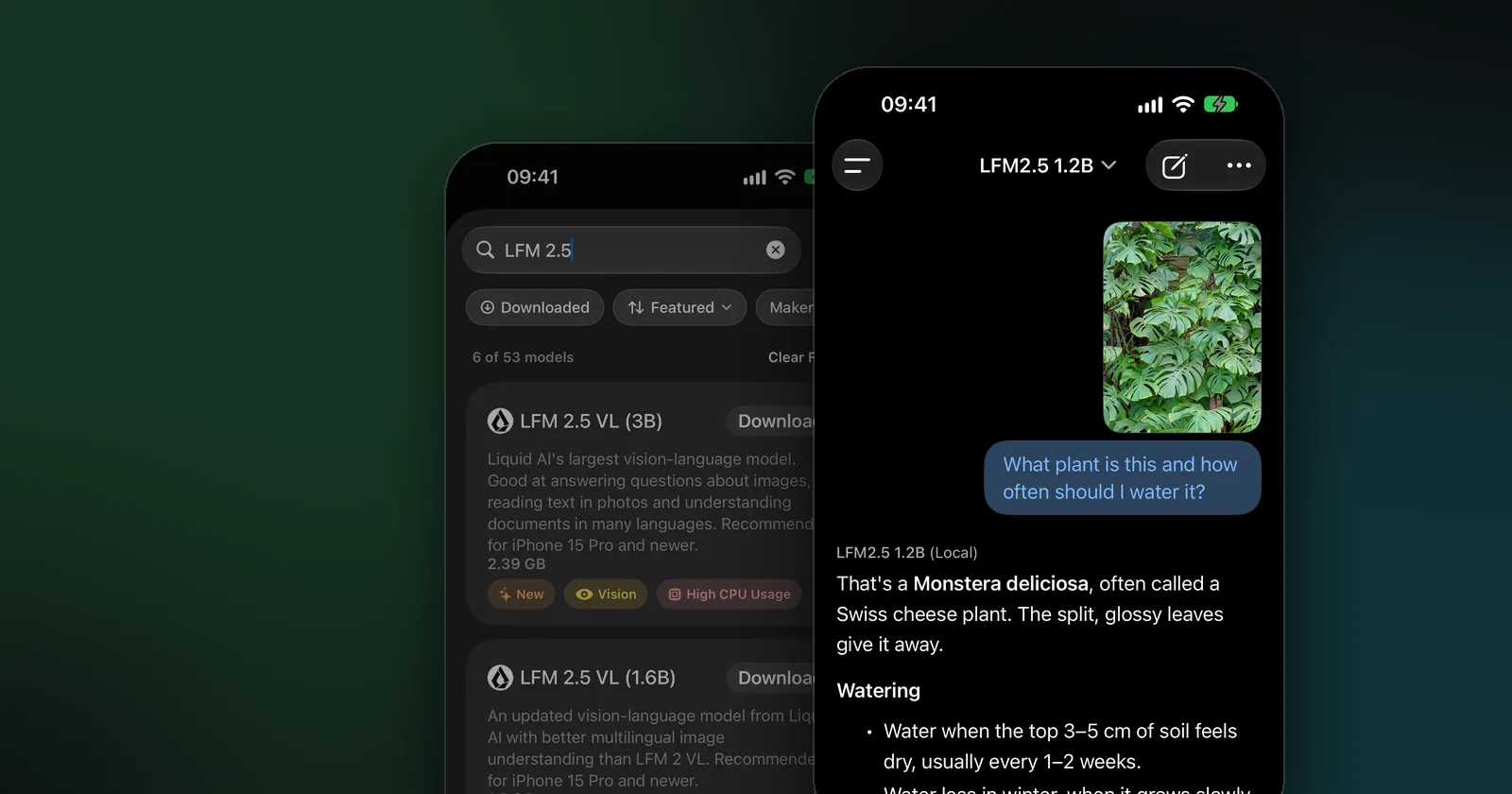
To ask AI about a photo on your iPhone, attach the picture to a chat and type your question: “What plant is this?”, “What does this sign say?”, “Is this receipt right?”. Most apps that do this upload your photo to a server. With Modelbase, a free app, the AI model runs on your iPhone, so the photo is read on the device and never leaves it. It works offline too.
This guide shows the steps, which models can see images, what to ask, and where the limits are.
What is a vision model?
A vision language model is an AI model that understands images as well as text. You give it a picture and a question, and it answers in words: it can describe a scene, read text in a photo, recognize objects, compare what it sees with what you ask, or explain a chart.
The vision models in Modelbase are small enough to run on a phone, from 381 MB to 3.58 GB. You’ll see them in the catalog with a yellow Vision tag.
How to ask AI about a photo
- Download a vision model. In a chat, tap the model’s name at the top, then Manage models > Local. A good start is LFM 2.5 VL (1.6B) from Liquid AI (1.5 GB) or Qwen 3.5 (2B) (1.75 GB), which also handles everyday chat well. Tap Download.
- Choose it. Tap the model’s name again and pick the vision model.
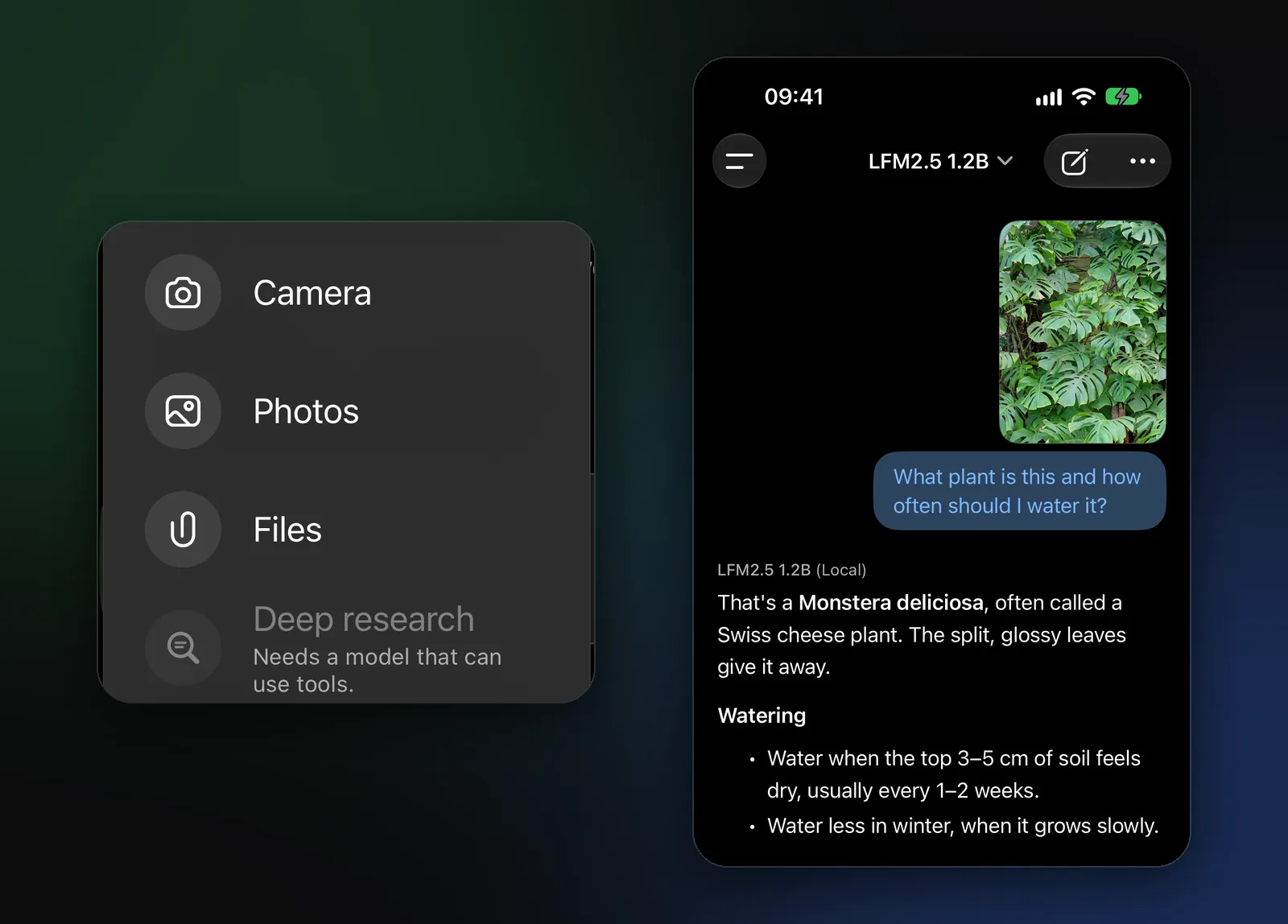
- Add the picture. Tap + next to the message field and choose Camera to take a photo now, Photos to pick one from your library, or Files for an image saved in Files.
- Ask your question and send. Be specific: “What plant is this and how often should I water it?” works better than “What is this?”.
- Follow up. The photo stays part of the chat, so you can keep asking: “Is it safe for cats?”, “Why are the leaves turning yellow?”.
What if the model you’re using can’t see images? You can still attach a photo. Modelbase tells you: “This model can’t see images. Your device reads photos and describes them to it.” Your iPhone reads the text and the main contents of the picture on the device and passes that description to the model. It works well for photos of text, such as signs, labels or documents, but a vision model, which looks at the picture itself, gives better answers about everything else.
Which models can see images?
Every model below runs on the device. Sizes are the downloads in the app.
| Model | Maker | Download | Good for |
|---|---|---|---|
| LFM 2.5 VL (450M) | Liquid AI | 0.38 GB | Quick descriptions on any device; recommended for iPhone 14 and older |
| SmolVLM 2 (256M / 500M) | Hugging Face | 0.52 / 1.02 GB | Tiny, simple descriptions |
| Qwen 3.5 (0.8B) | Qwen | 0.65 GB | Simple conversations and fast answers, with images |
| LFM 2.5 VL (1.6B) | Liquid AI | 1.5 GB | Better multilingual image understanding than LFM 2 VL |
| Qwen 3.5 (2B) | Qwen | 1.75 GB | Everyday chat and questions about images |
| Qwen 3 VL (2B) | Qwen | 1.80 GB | Reading text and seeing detail in a small package |
| LFM 2.5 VL (3B) | Liquid AI | 2.39 GB | Text in photos and documents in many languages |
| Ministral 3 (3B) | Mistral AI | 2.78 GB | Multilingual, follows instructions closely |
| Gemma 3 QAT (4B) | 3.03 GB | Many languages; trained to keep its quality when compressed | |
| Qwen 3.5 (4B) | Qwen | 3.06 GB | The most capable small Qwen: images, reasoning, writing |
| Gemma 4 (E2B) | 3.58 GB | Conversations, image analysis and reasoning |
The app also keeps the older LFM 2 VL (450M, 1.6B and 3B) and Qwen 2.5 VL (3B). Liquid AI’s two larger LFM 2.5 VL models and Gemma 4 (E2B) are recommended for iPhone 15 Pro and newer; the app shows the recommendation on each card.
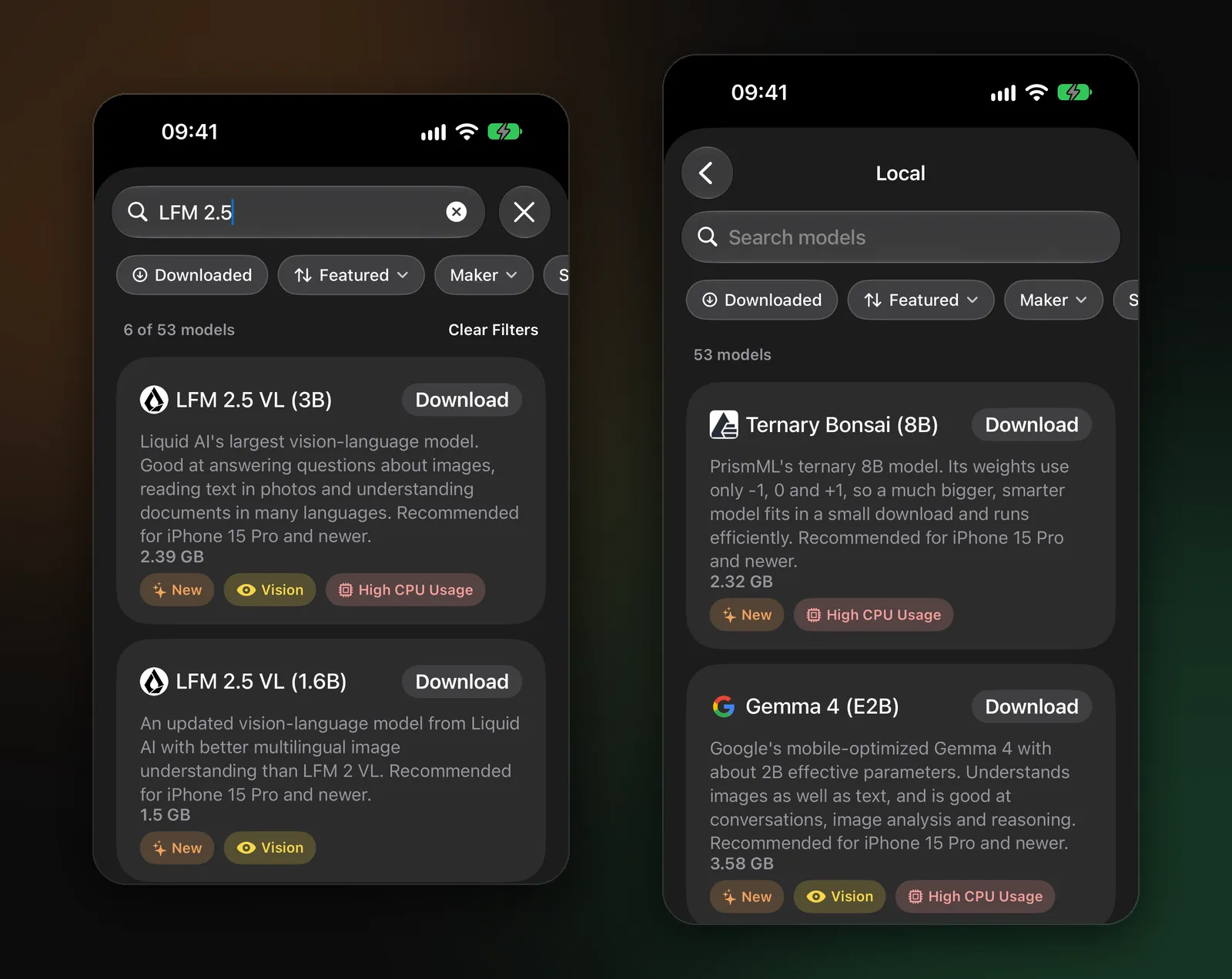
Not sure which to pick? Start with LFM 2.5 VL (1.6B) on a recent iPhone, or LFM 2.5 VL (450M) on an older one. If you have the space, Qwen 3.5 (2B) is a single model for both photos and everyday chat. Our model guide has more on choosing.
What to ask: ideas that work well
Plants and nature. “What plant is this?”, “How much light does it need?”, “Why are the leaf edges brown?”
Food and menus. “Translate this menu into English”, “Which of these dishes are vegetarian?”, “What’s in this dish?”
Signs and labels abroad. “What does this sign say?”, “Is this parking sign telling me I can park here now?”, “What are the washing instructions on this label?”
Receipts and bills. “Add up these items”, “What’s the total before tax?”, “Is anything charged twice?”
Screens and errors. Take a screenshot of an error message and ask “What does this mean and how do I fix it?”
Homework and diagrams. “Explain this diagram”, “Walk me through this chart.”
Around the house. “What is this part called?”, “What do these symbols on my oven mean?”
What happens to your photo?
With a model on your device, nothing is uploaded. The photo is read on your iPhone, by your iPhone. Modelbase has no account and no analytics, and we never receive your chats or pictures.
If you turn on iCloud sync, your chats sync through your own iCloud, but attached photos and files stay on the device they were added on. Only if you choose a cloud model yourself (OpenRouter with your own key, or a server of your own) do your messages and attached images go to that service, and the app says so.
Tips and limits
- Get the picture right. Good light, the subject filling the frame, and text in focus make a bigger difference than the model you choose.
- Ask one thing at a time. Small models do best with a clear, specific question.
- Small models can be wrong. They can misread a word or confuse similar plants and products. Don’t rely on a photo answer for anything risky, such as whether a mushroom or berry is safe to eat, or what a medicine is.
- Bigger is better, up to your memory. If answers feel vague, try a larger vision model; if the phone struggles, try a smaller one.
- It works offline. Once the model is downloaded, you can ask about photos on a plane or abroad without data. See what else works offline.
FAQ
Is there a free app to ask AI about a picture on iPhone?
Yes. Modelbase is free on the App Store, needs no account, and includes vision models such as LFM 2.5 VL and Qwen 3.5 that answer questions about photos on the device.
Does it work without internet?
Yes. Once a vision model is downloaded, you can take or pick a photo and ask about it with no connection.
Can the AI read text in a photo?
Yes. Vision models can read signs, labels, menus and documents, and translate them. Even a model without vision gets the text, because your iPhone reads it from the photo first.
Does Modelbase upload my photos?
No. With a model on your device, the photo is processed on your iPhone. Attached photos don’t sync to iCloud either. They’re only sent anywhere if you pick a cloud model you connected yourself.
Which iPhone do I need?
Any iPhone with iOS 18. On older or smaller phones, use the lightest vision models, such as LFM 2.5 VL (450M); the larger ones are recommended for iPhone 15 Pro and newer.
Can I ask about a photo on my Mac or iPad?
Yes. Modelbase runs on iPad and on Macs with Apple silicon, with the same vision models. On a Mac, you can add an image from your files.
Try it on your iPhone, iPad or Mac
Modelbase is free on the App Store.