Private ChatGPT alternatives that work offline, on iPhone, Mac and PC
· By Modelbase Team
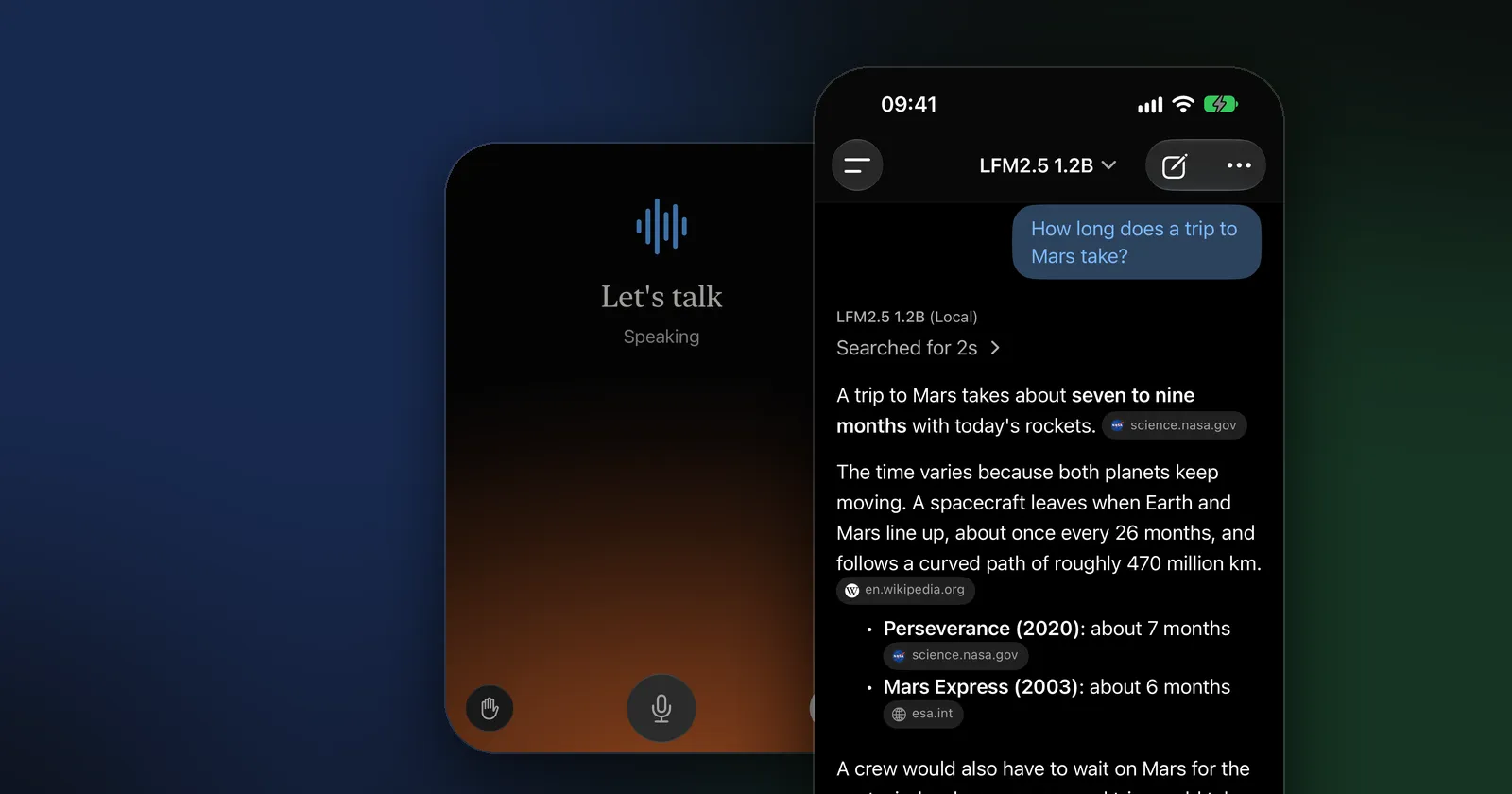
A private ChatGPT alternative is an app that runs the AI model on your own device, so your conversations never go to a company’s servers. On an iPhone, apps such as Modelbase, PocketPal AI, Locally AI and Private LLM do this; on a Mac or PC, LM Studio, Ollama, Jan and AnythingLLM do. They work offline, need no account in most cases, and are free or cheap. What you give up is size: the models that fit on your device are smaller than the ones behind ChatGPT, so they know less and are weaker at hard problems.
ChatGPT is more than a chat box, so this guide goes feature by feature: for each thing you use ChatGPT for, which private, on-device apps can do it. Every app detail was checked on its App Store page or official site as of November 2026. Modelbase is our app; we’ve held it to the same facts-only standard.
Why people look for a private ChatGPT alternative
- Privacy. With a cloud chatbot, your messages are processed on the provider’s servers (what ChatGPT keeps: Is ChatGPT safe?). With a local model, they stay on your device. That matters for health questions, legal or money matters, work documents, and anything about other people.
- Offline use. ChatGPT doesn’t work without a connection (why). A local model works on a plane, abroad or in a basement.
- No account, no subscription. Most local apps are free and need no sign-up.
- Control. You choose the model, and it doesn’t change under you.
ChatGPT’s features, done privately
| What you use ChatGPT for | On iPhone, on the device | On a Mac or PC, on the computer |
|---|---|---|
| Chat, writing, summaries | Modelbase, PocketPal AI, Private LLM, Locally AI, Liquid Apollo, Enclave | LM Studio, Ollama, Jan, AnythingLLM, Msty Studio, GPT4All |
| Questions about photos | Modelbase, PocketPal AI, Locally AI, Enclave | LM Studio, Ollama, Jan |
| Talking by voice | Modelbase, Locally AI, Enclave; PocketPal AI (hands-free mode with Plus) | Open WebUI, AnythingLLM |
| Chatting with PDFs and documents | Modelbase, Enclave | LM Studio, Jan, GPT4All, AnythingLLM, Msty Studio, the Ollama app |
| Step-by-step reasoning | Apps that run reasoning models such as DeepSeek R1 distills: Modelbase, Private LLM, Locally AI, Enclave | LM Studio, Ollama, Jan |
| Web search | Modelbase (with numbered sources; sends only the query); PocketPal AI; Enclave (with its cloud models) | Open WebUI |
| Custom instructions, assistants | Modelbase, Enclave | LM Studio and Msty Studio (saved prompts) |
| Syncing chats across devices | Modelbase (through your own iCloud) | Varies |
Web search and sync need a connection by nature; the rest works offline once a model is downloaded.
On iPhone and iPad
These run language models on the phone itself. Full details in The best offline AI apps for iPhone.
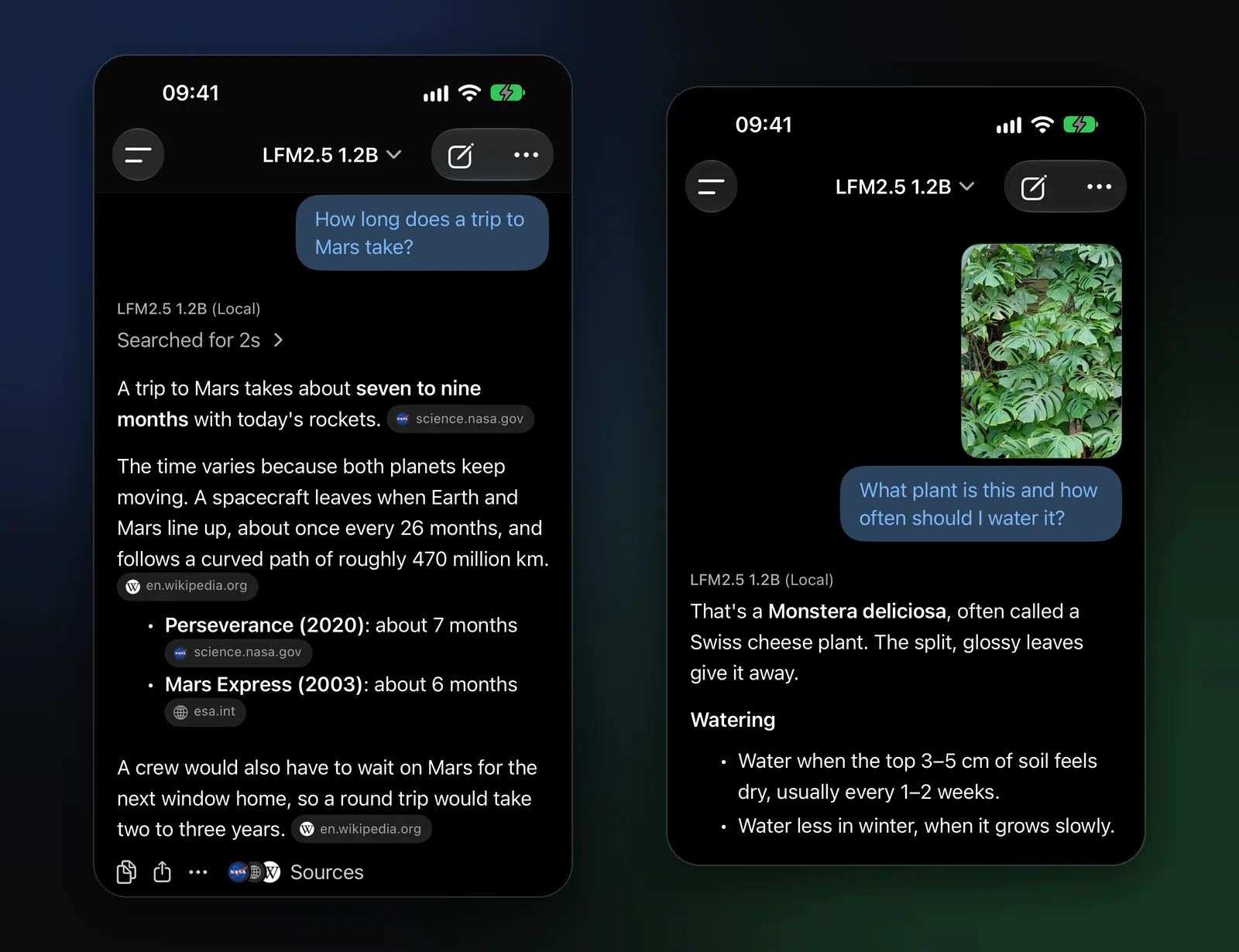
- Modelbase, free: a model is included, so it works offline from the first launch; 53 open models in its catalog; photos, voice, PDFs, web search with sources, iCloud sync through your own iCloud. App Store privacy label: Data Not Collected.
- PocketPal AI, free with optional purchases: open source (MIT), runs any GGUF model you find on Hugging Face, with vision, voice and web search. Also on Android.
- Private LLM, $4.99 once (as of November 2026) for iPhone, iPad and Mac: more than 140 models, Siri and Shortcuts; text only in the current release.
- Locally AI by LM Studio, free: MLX models, image analysis and on-device voice mode.
- Liquid Apollo, free: Liquid AI’s own small models on the device, plus OpenRouter or your own server.
- Enclave, free with an optional Pro subscription: local models with voice chat and document chat; needs iOS 27.
On a Mac or PC
These run models on your computer. Full details in The best apps to run local LLMs on a Mac and LM Studio vs Ollama.
- LM Studio, free (also at work): a desktop app with Hugging Face search, document chat and a local server. Mac (Apple silicon), Windows, Linux.
- Ollama, free and open source: a local model server with a desktop app on Mac and Windows, and many chat apps built on it.
- Jan, free and open source: describes itself as an open-source alternative to ChatGPT that runs fully offline on your computer.
- AnythingLLM, free desktop app, open source: chat with your documents and build agents.
- Msty Studio, free with a paid Aurum plan: a workspace for local and cloud models.
- GPT4All, free and open source, with LocalDocs; its latest release, as of November 2026, is from February 2025.
What about OpenAI’s own open models?
OpenAI has published open-weight models, gpt-oss-20b and gpt-oss-120b, that you can run yourself. They aren’t ChatGPT, and they’re computer-sized: the 20B is a 14 GB download in the Ollama library, and OpenAI says it runs on devices with 16 GB of memory. On a capable Mac or PC, that’s the closest thing to a private, offline “ChatGPT by OpenAI”. A phone needs smaller models.
What you give up, honestly
- Knowledge and reasoning. Phone models have a few billion parameters at most; computer models can be larger, but rarely as large as the biggest cloud models. Expect more mistakes on niche facts and complex problems, and check anything important.
- Fresh information. Offline, a model knows only its training data and what you give it. Apps with web search (when online) close part of that gap.
- Storage, memory and battery. Models take space, need free memory to run, and work your device’s chip hard.
- Polish. ChatGPT bundles many features in one place; locally, you may combine two apps, for example a server on your computer and a client on your phone.
How to judge whether an app is really private
- Where does the model run? On the device, on your own computer, or on someone’s server? Many apps offer all three; check which one each chat uses. Modelbase, for example, marks OpenRouter models in the model picker and says when a model runs on a server and your messages are sent there.
- What’s the App Store privacy label? “Data Not Collected” means the developer says it collects nothing.
- Is there an account? No account means nothing to link your chats to.
- What goes online, and when? Web search, weather or cloud models send something; a good app tells you what.
- Is it open source? Not required for privacy, but it lets others check the code. PocketPal AI, Ollama, Jan, AnythingLLM and GPT4All are.
FAQ
Is there a private version of ChatGPT?
ChatGPT itself runs on OpenAI’s servers. For full privacy, use an app that runs an open model on your own device, such as Modelbase or PocketPal AI on iPhone, or LM Studio, Ollama or Jan on a computer.
What is the best free ChatGPT alternative that works offline?
On iPhone, Modelbase works offline from the first launch because it comes with a model; PocketPal AI, Locally AI and Liquid Apollo are free too. On a computer, LM Studio, Ollama and Jan are free. Which is best depends on the features you need (see the table above).
Do local AI apps work without internet?
Yes, once a model is downloaded. Features that fetch information, such as web search or the weather, need a connection.
Can I use ChatGPT’s own models offline?
Not ChatGPT, but OpenAI’s open-weight gpt-oss models run offline on a computer with enough memory, in tools such as Ollama or LM Studio.
Are private AI apps as good as ChatGPT?
For everyday writing, summaries, explanations and questions about your own documents and photos, often good enough. For the hardest reasoning, long analysis and up-to-date research, large cloud models are still ahead.
Try it on your iPhone, iPad or Mac
Modelbase is free on the App Store.